
Creating a “hook” so people sign up for your list
A few things to remember when offering a hook:- Make it stand out with a good title, copy is one of the most important things because if people can’t see the benefits of signing up, then they simply won’t!
- Add a eBook design, this helped a lot to make it stand out and make it look like there was value to the FREE eBook. For those looking to get a eBook design, I recommend you check out Digital Point webmaster forums because it’s the cheapest place to go for small design work like a eCover.
- Social Proof, if you have several hundred or a lot more, then show it off with a Aweber List Counter, if your readers see you have a lot of sign ups, they will think they should to because everyone has.
Setting up your email list and adding an auto-responder series
Once you have decided what type of list you want to have, you have to create it. Like I mentioned above, you should use the service called Aweber, by far the best and has some great features to work with. Once you have ordered Aweber, login and we can start.If you have done that, here’s what to do next: In the top left corner, below the logo you will see a link to Create and Manage List, click this and then click Create a New List. Fill out the form and click Save List Settings. Now we need to create a opt-in form so people can sign up for your mailing list on your website, in the header, click Web Forms followed by Create Web Form. Fill out the form and click Next, an example of one of my forms is below:
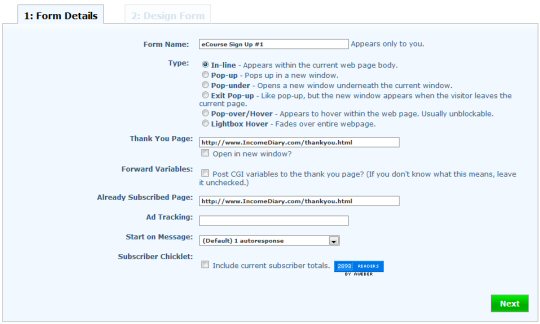
- Creating a Opt-in Box For Your Blog.
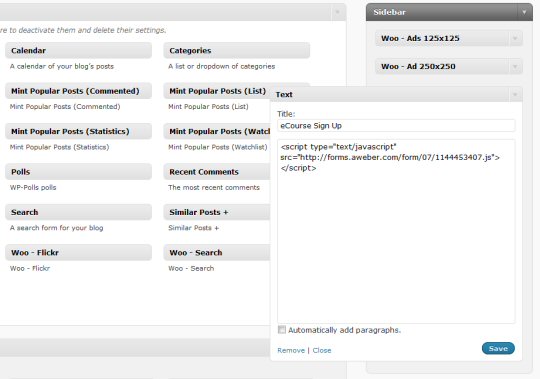
- Add Your Newsletter Opt-in Box To Your Blog.
Autoresponder Series
The next you want to do straight away is set up your first autoresponse email for when people sign up. To set up your first autoresponse, go back to Aweber and put your cursor over Broadcast and a drop down box will appear, click Follow Up. Now click Add New Follow Up Message, you will now be able to set up your first autoresponse email, it’s all quite self explanatory, you can choose to customize it in a few ways such as use code like {!name_fix} to input the name of the person on your list who will be receiving it. A good thing to do on your first email if it’s not a eCourse is to just simply introduce yourself and mention all your important pages on your website.
- Michael Setting Up Day 1 Of The Make Money Online eCourse.
Autoresponders can be used in lots of different ways, myself I use it to provide my FREE eCourse to teach everyone how to create a blog. Some people set up a year worth of emails to be sent out, some daily, some weekly but each time it refers them back to their website to have another chance at making them money. I have one friend who uses his list quite often to promote affiliate promotions, every time he gets a good response from a email, he will add it to his autoresponder as he knows it performs and will likely make more sales when new people sign up for his email list.
Making Money From Your Email List
You see I make it a slight mission to get people to sign up for my eCourse because this way I know they really want to be on it. Before I even get them to sign up I make them know they need to spend money on Domains, Hosting and a Web Design. Typically a lot of people buy before they sign up because I make it feel like the course is conditional on them buying the products. Once they buy they sign up, even if they do or don’t buy the product they will then go to a thank you page. This is where a lot of people go wrong, your thank you page is probably the most important page because they have already taken action and are interested right now! This is where I make sure they know to confirm there email address but also I let them know again to buy a domain and hosting. On this page I always cut out the navigation which is on the main site so they have to scroll through the page first to see what I have to say before there is a link to go back to the main site.Sending Out Affiliate Promotions
Here is where you can make more in a single day (actually 2 minutes it takes to send) then your blog makes in a month. I recently sent out a couple promotions for related products to my site, both had up sells and both had recurring revenue built in, two things you want to look for when choosing something to promote as that can bump up your earnings a lot. I made around $2000 from the two emails and both had recurring payments so since then I have earned several thousand dollars. It’s super easy and your list doesn’t have to be big, mine was a 4 month old list I built from a new blog. Another great thing about participating in product launches are the affiliate contests where you can win prizes if you perform well as an affiliate.
- One Email I Sent Out Made Me $1,500!
- Always look for the best offer, for example you can sell a eBook were you will get a commission, but you would be best to find a offer that has a recurring revenue program built in so you don’t just earn today, you earn for months and years to come. For example the promotion I talked about that I did in Cyprus just over a month ago, I have since earned around $1000 in follow up payments from the recurring revenue program. Another great thing to look out for is up sells, on some promotions I make more money from just the up sells then the course itself.
- Don’t send to many promotions out, typically you can get away with around 3 a week and no one gets to cross but I try to limit to once if it’s a direct promotion but most of the time I don’t send out ones at all because I know my eCourse performs well.
- Make sure you send promotions for target products, if you can’t send many emails because you are worried people will drop out then you want to get the best results possible. Wait for a promotion that fits 100% with your business.
- Send out emails before the launching offering the affiliates FREE reports, this is huge! Basically they give you an affiliate link which you can promote to your list and when they sign up for it and get a FREE report or eBook they are now signed up through your affiliate link so when they email the there list about the launch of the product and anyone you send for the FREE eBook buys, then you make a commission, this way you don’t look like your pushing the sale yourself.
- Be the first to promote, so often dozens of affiliate will email a new promotion on the same day, the first person is more likely to get the most sales. This is because a lot of lists have the same people on them so you want to be the first one to let your mailing list know.
Email Marketing Rules
You now have all the information you need to set up and start earning from your mailing list. I thought I would finish by offering a few rules I run my list by to make sure I make the most out of my list and get the best results.Rule 1: DON’T SPAM!
Rule 2: Try not to share your list, often for new product launches they will get you to send pre launch emails to get them to opt-in for a FREE report, this is a bad idea because then they basically get a copy of your list although it’s a great way to convert more sales. OK, not everyone will agree with that one and there are times when I will share the list, but the above point is well worth remembering — at least some of the time

Rule 3: Be personal, your a human being (I hope) so come across like one and not a spam bot.
Rule 4: Be consistent in what you offer your readers, if you are offering great blogging tips then don’t just “wack” up a post about blogging just because you have to, make sure everything to provide has true value.
Rule 5: Be consistent in how often you email your readers – I get some readers who actually email me saying “Hey Mike, I haven’t heard from you in a while, when is your next update?”. I try to update them Monday, Wednesday and Friday.
Rule 6: It’s not all about the money, don’t promote something just because you want to make money but because your readers actually need it – and you would personally buy it!
I hope today’s post has helped you all out a lot and if you are new to making money online and haven’t yet set up your blog to drive sign ups to your mailing list, then I recommend you take my FREE 7 Day eCourse on How To Make Money Blogging.


0 comments:
Post a Comment
Please comment here